ChirpStack Middleware
Overview
Valeiot provides a ChirpStack Middleware that enables seamless integration between ChirpStack and the Valeiot platform using HTTP integrations.
This middleware acts as a bridge, receiving events from ChirpStack and securely forwarding device data to Valeiot using your Network Token.
Uplink Configuration
Step 1: Getting the Network Token
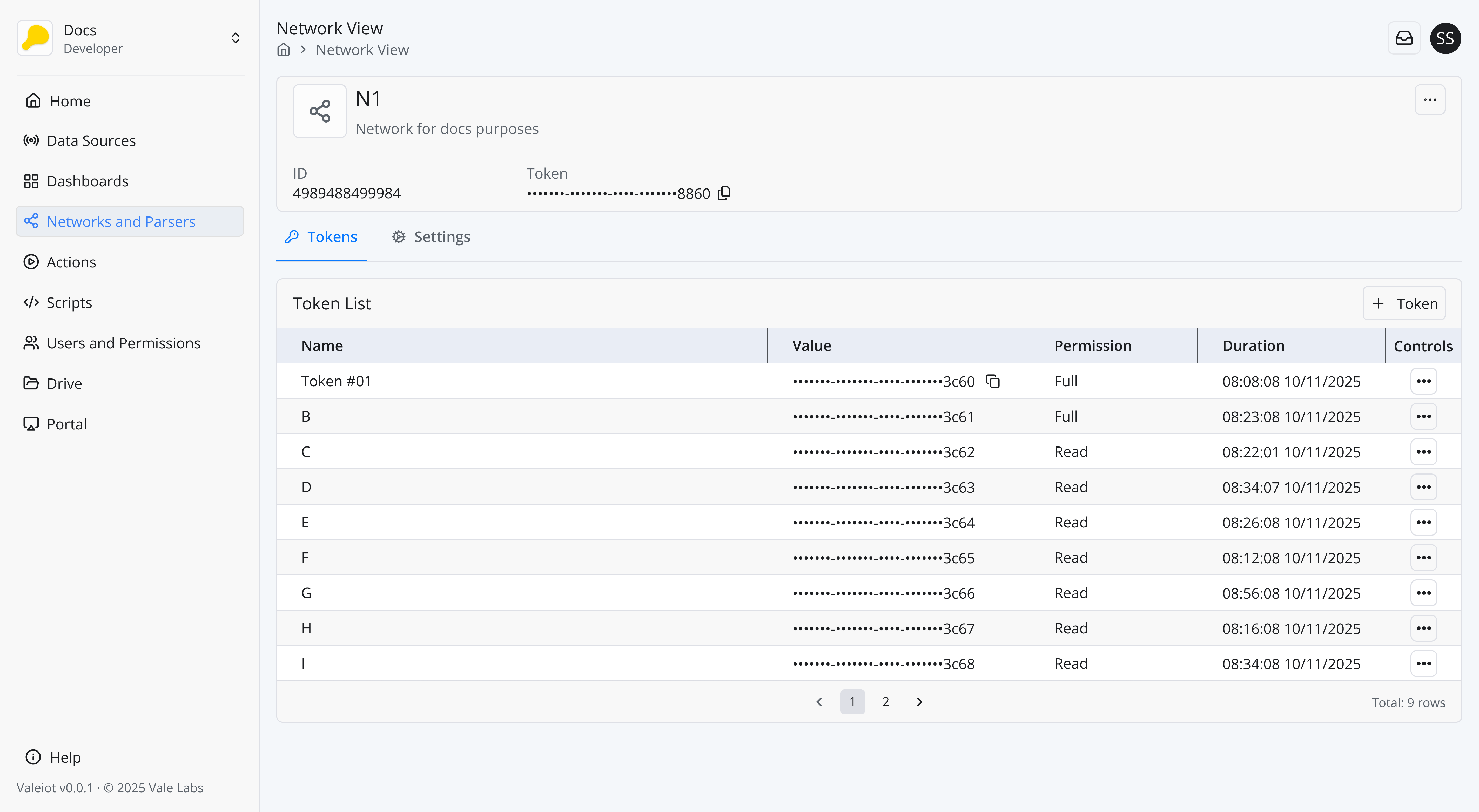
You will need the Network Token from the network your device belongs to.
Navigate to the Valeiot Console:
https://console.valeiot.com/
Then go to:
Networks > ** Select the Network your device belongs to ** > Tokens
If you do not have any tokens created yet, create a token with FULL permission.
Copy the token with FULL permission and store it securely, as it will be required later for authentication.
Token example:
us1:Fe1l4K3UUm379kwlVhUn7saOwLmsYMS0RmRmXGH5yZcfSRQYsikQnuEGFV3c60
Step 2: Set up the ChirpStack Integration
In ChirpStack, create an Application.
Then configure an HTTP Integration for that application.
Navigate to:
Applications > Integrations > HTTP
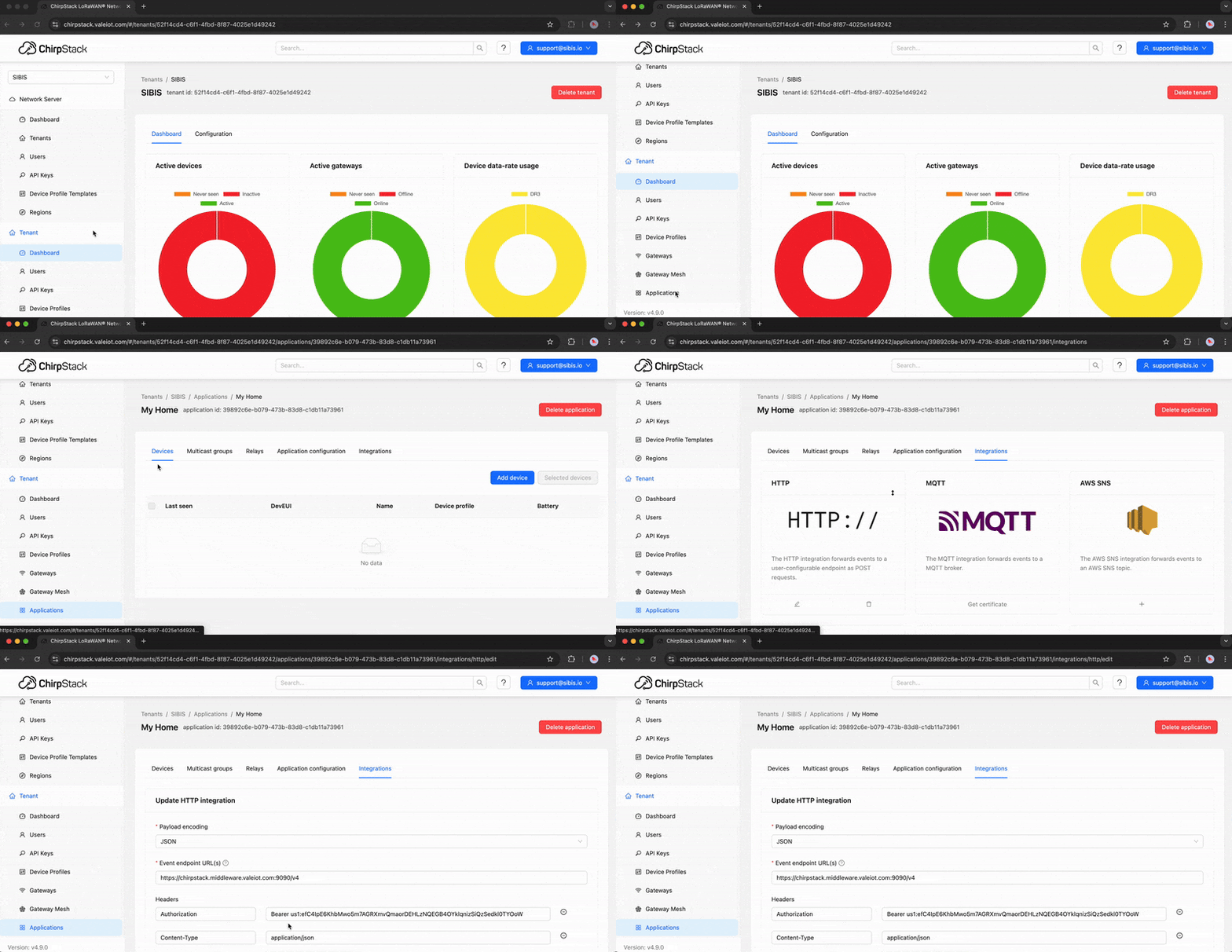
Fill in the Update HTTP Integration form with the following information:
Payload encoding: JSON

Event endpoint URL(s): https://chirpstack.middleware.valeiot.com:9090/v4

Headers
Authorization: Bearer YOUR_NETWORK_TOKEN
Content-Type: application/json
Example:
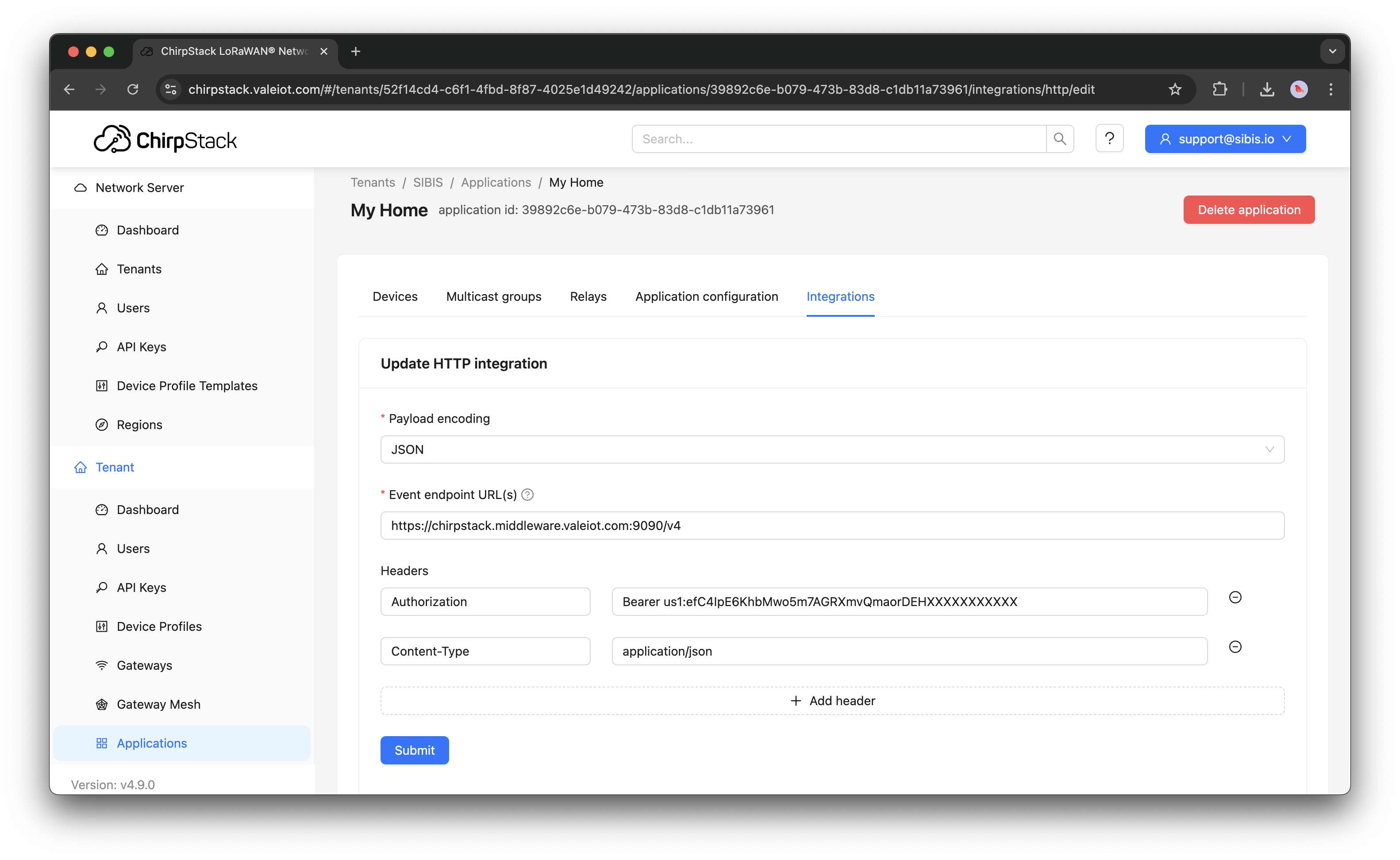
The Authorization header is mandatory.
Confirm that the Network Token is valid and has FULL permission.
Make sure the token belongs to the same network as the device.
Step 3: Verify payload ingestion and create a Payload Parser
Once configured, you should start seeing data arriving in Valeiot.
In the device view, verify that the payload is being ingested as Data Points.
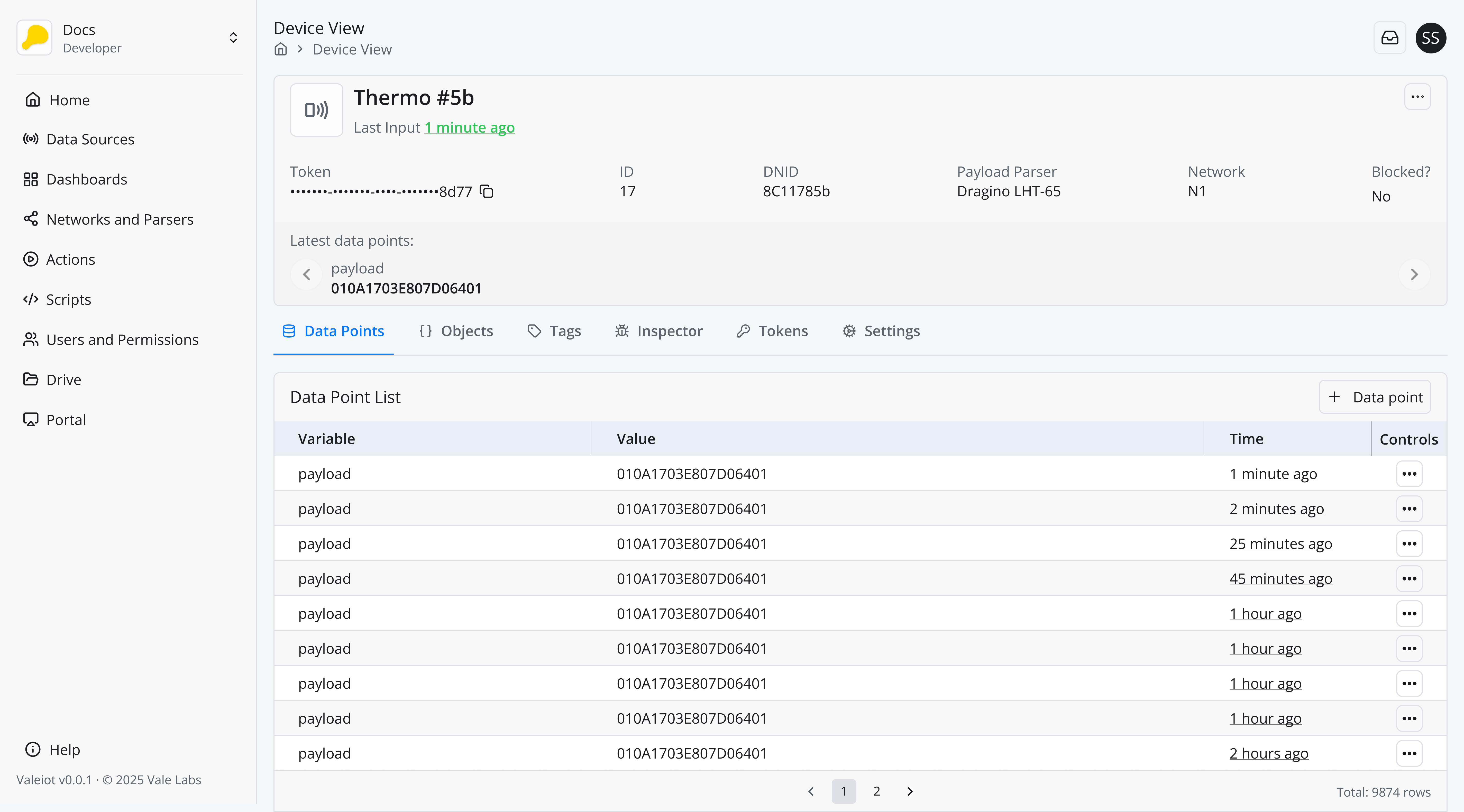
At this stage, the payload is usually in hexadecimal format (for example: 010A1703E807D06401).
To convert this raw payload into human-readable variables (such as temperature, battery level, location, etc.), you must create a Payload Parser.
Refer to the Payload Parser section to learn more.
Uplink Summary
- End devices send uplinks to ChirpStack
- ChirpStack triggers the HTTP Integration
- Valeiot ChirpStack Middleware receives the event
- Data is validated and authenticated using the Network Token
- Payload is ingested into Valeiot as Data Points
- A Payload Parser decodes the payload into multiple variables
Downlink Commands Using ChirpStack
To perform a downlink command using ChirpStack, use the following API route:
http://${chirpstackServer}/api/devices/${datasource.dnid}/queue
To perform a downlink, the device must have communicated at least once.
Below is an example of how to perform a downlink using the Valeiot SDK.
import {
  DatasourceDetails,
  EventContext,
  ScriptEvent,
  WorkspaceConn,
} from "@sibis/valeiot-sdk";

interface Downlink {
  type: string;
  uplinkTime: string;
  alarmRange: string;
}

const COMMANDS = {
  ALARM_TYPE: "A1",
  UPLINK_TIME: "B1",
};

const alarmRangeMap: Record<string, string> = {
  "ON": "00",
  "OFF": "01",
};

const uplinkTimeMap: Record<string, string> = {
  "5 min": "00",
  "30 min": "08",
  "1 hour": "0C",
};

export async function downlinkHandler(ctx: EventContext, ev: ScriptEvent) {
  const conn: WorkspaceConn = ctx.get("conn");
  const downlink: Downlink = ev.content.formData.data;
  const datasource: DatasourceDetails = ev.content.fullRowData;

  const object = datasource.objects.find(
    (obj: any) => obj.key === "info"
  );

  if (!object) {
    ctx.result.set("Failure!", "Missing 'info' object in datasource.");
    ctx.result.setFailed();
    return;
  }

  const objectPromise = conn.datasources.objects.updateValue({
    datasourceId: datasource.id,
    objectId: object.id,
    body: {
      ...object.value,
      ...downlink,
    },
  });

  const datapoints = datasource.datapoints || [];
  if (datapoints.length === 0) {
    ctx.result.set("Failure!", "No datapoints found in the datasource.");
    ctx.result.setFailed();
    return;
  }

  try {
    const port =
      datapoints.find((dp: any) => dp.variable === "port")?.value ?? 2;

    const base64Data = parseDownlinkData(downlink);

    const queueItem = {
      confirmed: true,
      fPort: port,
      data: base64Data,
    };

    if (!process.env.CHIRPSTACK_API_KEY) {
      ctx.result.set(
        "Failure!",
        "CHIRPSTACK_API_KEY is not configured."
      );
      ctx.result.setFailed();
      return;
    }

    const chirpstackServer =
      process.env.CHIRPSTACK_SERVER ||
      process.env.MIDDLEWARE_ENDPOINT ||
      "chirpstack.valeiot.com:8090";

    const apiUrl = `http://${chirpstackServer}/api/devices/${datasource.dnid}/queue`;

    const response = await fetch(apiUrl, {
      method: "POST",
      headers: {
        "Content-Type": "application/json",
        "Grpc-Metadata-Authorization": `Bearer ${process.env.CHIRPSTACK_API_KEY}`,
      },
      body: JSON.stringify({ queueItem }),
    });

    if (!response.ok) {
      const errorData = await response.json().catch(() => ({
        message: "Unknown error",
      }));

      ctx.result.set(
        "Failure!",
        `Failed to send downlink. Reason: "${
          errorData?.message || JSON.stringify(errorData)
        }"`
      );
      ctx.result.setFailed();
      return;
    }

    ctx.result.set("Success!", "Downlink successfully enqueued.");
  } catch (error: any) {
    ctx.result.set(
      "Failure!",
      `Error processing downlink: ${
        error?.message || JSON.stringify(error)
      }`
    );
    ctx.result.setFailed();
    return;
  }

  await objectPromise;
  ctx.result.set("Success!", "Downlink processed successfully.");
}

/**
 * Converts a hex string to Uint8Array
 */
function hexToUint8Array(hex: string): Uint8Array {
  const length = hex.length / 2;
  const bytes = new Uint8Array(length);
  for (let i = 0; i < length; i++) {
    bytes[i] = parseInt(hex.slice(i * 2, i * 2 + 2), 16);
  }
  return bytes;
}

/**
 * Converts Uint8Array to base64
 */
function uint8ArrayToBase64(bytes: Uint8Array): string {
  return Buffer.from(bytes).toString("base64");
}

/**
 * Command-based downlink encoding
 */
function parseDownlinkData(downlink: Downlink): string {
  let payloadHex: string;

  if (downlink.type === "Configure alarm state") {
    const value = alarmRangeMap[downlink.alarmRange];
    if (!value) {
      throw new Error(`Invalid alarm range: ${downlink.alarmRange}`);
    }
    payloadHex = COMMANDS.ALARM_TYPE + value;
  } else if (downlink.type === "Configure uplink frequency") {
    const value = uplinkTimeMap[downlink.uplinkTime];
    if (!value) {
      throw new Error(`Invalid uplink time: ${downlink.uplinkTime}`);
    }
    payloadHex = COMMANDS.UPLINK_TIME + value;
  }

  return uint8ArrayToBase64(hexToUint8Array(payloadHex));
}